
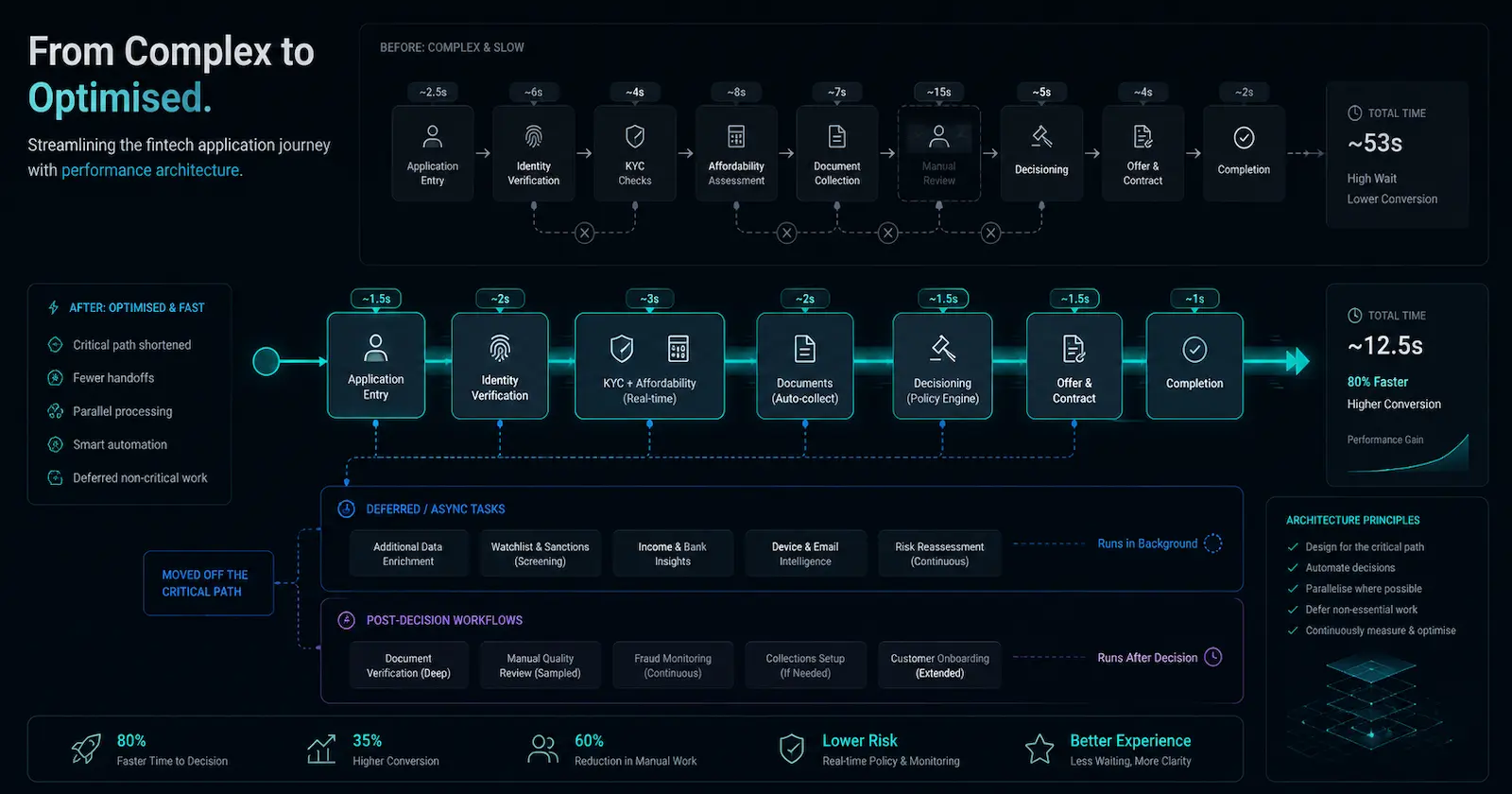
Performance isn't just a checklist of optimizations. It's a mental model of elimination, efficiency, and scheduling—a way of understanding what work the system is making the user wait for, and why.
TL;DR#
Frontend performance is not just about applying a checklist of optimisations. In fintech, it is about understanding what work the system is making users wait for, especially during high-friction journeys like applications, affordability checks, document uploads, payments, and internal case handling.
Most meaningful performance work comes down to three architectural decisions:
-
Elimination: stop doing unnecessary work.
-
Efficiency: make necessary work cheaper.
-
Scheduling: move work out of the user’s way.
Checklists are useful for catching common issues, but they do not explain why a system is slow, where waiting is introduced, or which trade-offs are acceptable for the product, the user, and the domain. That requires engineering judgement.
The best frontend performance work is not always about shaving milliseconds from a component. Sometimes it is about avoiding repeated data fetching, reducing unnecessary renders, caching stable data, sequencing work more carefully, or deciding where freshness matters and where stale-while-revalidate is acceptable.
In fintech, those decisions matter because latency affects more than speed. It affects trust, confidence, conversion, support volume, compliance risk, and operational flow.
Why Frontend Performance Needs More Than a Checklist#
Frontend performance checklists are useful.
They give teams somewhere practical to start. They remind us to set image dimensions, compress assets, audit third-party scripts, split bundles, virtualise long lists, measure Core Web Vitals, and avoid the obvious mistakes that quietly damage the user experience.
But in fintech, frontend performance is rarely just about making a page feel faster.
It is about protecting attention during high-friction customer journeys, keeping internal dashboards usable under operational pressure, and making sure users are not blocked by work that the system could have avoided, cached, delayed, or moved elsewhere.
When a customer is completing an application, uploading documents, checking affordability, reviewing figures, or waiting for a decision, latency is not just a technical detail. It affects confidence, conversion, support volume, and trust. For internal teams, a slow dashboard can turn simple case handling into repeated context switching. The cost is not only milliseconds. It is interrupted flow, duplicated work, and operational drag.
That is where checklists start to run out of road.
They can tell you what to inspect. They can catch obvious mistakes and stop the same basic issues from slipping through review again and again. What they cannot do is explain what the system is doing, why it is doing it, who is waiting for it, or whether the right fix is technical, architectural, product-related, or organisational.
Production performance issues rarely arrive neatly labelled. They do not usually announce themselves as an image problem, a JavaScript problem, a rendering problem, an API problem, or a caching problem. They show up in messier, more human ways.
A dashboard freezes when users switch between views. Navigation feels slower after a redesign. Support reports that customers are dropping off at a particular step. Lighthouse says the page looks fine, but people using the product every day disagree.
For that, you need something deeper than a checklist.
You need engineering judgement: the ability to understand which work matters, which work is waste, and which trade-offs are acceptable for the product, the user, and the domain.
You need a model of the work the system is performing, the cost of that work, and the points where users are forced to wait.
Performance Is About Work and Waiting#
The shift from checklist thinking to architectural thinking starts with a different question:
What work is the system making the user wait for?
Once you ask that question, performance stops being a scavenger hunt for missed optimisations. It becomes a way of understanding how the system behaves under real use.
You are no longer simply asking whether the team has applied the usual performance tricks. You are asking what work is happening, why it is happening at that specific moment, and whether the user actually needs to wait for it before they can continue.
That distinction changes the investigation.
A slow page is no longer just “a page that needs optimisation”. It becomes a sequence of work: data fetching, rendering, hydration, JavaScript execution, image loading, route transitions, third-party scripts, permissions checks, state updates, and browser layout work.
Some of that work is essential. Some of it is waste. Some of it is happening at the wrong time.
The job is to understand the difference.
Most meaningful frontend performance work comes down to three decisions:
1Can we stop doing this work?2Can we make this work cheaper?3Can we move this work out of the user's way?
That sounds simple, but it changes how you reason about performance techniques.
Virtualising a long list is not just something from a checklist. It is a way of avoiding rendering work the user cannot currently see. Compressing an image is not just good hygiene. It is a way of making necessary visual work cheaper. Prefetching a route is not magic. It is a scheduling decision that moves work earlier so the user is not left waiting after they click.
Stale-while-revalidate follows the same logic. It is not just a caching pattern. It is a trade-off between freshness, waiting, and perceived responsiveness. You are deciding that the interface can show useful existing data now while the system updates itself in the background.
This is why checklist thinking is useful but incomplete.
A checklist gives you possible tactics. It does not tell you which trade-off is appropriate for the situation in front of you.
Architecture gives you that judgement.
A Simple Model for Performance Architecture#
The model I keep coming back to is simple.
Most performance architecture is about elimination, efficiency, or scheduling.
1Performance Architecture2 ├── Elimination: Stop doing unnecessary work3 ├── Efficiency: Make necessary work cheaper4 └── Scheduling: Move work out of the user's way
This model does not replace performance checklists. It gives them somewhere to live.
A checklist might tell you to lazy-load content, reduce JavaScript, compress assets, cache data, defer scripts, or virtualise long lists. Those are useful actions, but they become easier to reason about when you understand the kind of problem you are solving.
Sometimes the right move is elimination. The system is doing work that does not need to happen, such as rendering content the user cannot see, refetching stable data on every navigation, hydrating components that do not need interactivity, or recalculating state that has not changed.
Sometimes the right move is efficiency. The work is necessary, but the cost is higher than it needs to be. In that case, the answer might be smaller payloads, better data structures, cheaper rendering paths, fewer dependencies, compressed assets, or more focused API responses.
Sometimes the right move is scheduling. The work still needs to happen, but it does not need to block the user. That is where techniques like prefetching, caching, lazy loading, background revalidation, deferred scripts, streaming, and optimistic UI become useful.
The distinction matters because the same technique can be useful in one context and harmful in another.
Caching can make a dashboard feel instant, but it can also hide stale data in places where freshness is critical. Lazy loading can improve the initial render, but it can make later interactions feel worse if the user immediately needs the delayed content. Code splitting can reduce initial JavaScript, but it can also create awkward loading gaps if chunks are discovered too late.
The technique is not the architecture.
The trade-off is.
1. Elimination: Stop Doing Work the User Does Not Need#
The fastest work is the work the system never performs.
That sounds obvious, but real frontend applications are full of unnecessary work: components rendered that the user cannot see, data fetched that the current screen does not need, components hydrated that do not require interactivity, state validated that has not changed, and computations rerun because the application has no memory of previous work.
A checklist might tell you to memoise expensive components or lazy-load content below the fold. Those may be good interventions, but they are not the first question.
The better question is:
Why is this work happening at all?
Instead of asking how to make a render faster, ask whether the component needs to render right now.
Instead of asking how to speed up a request, ask whether the request needs to happen on every navigation.
Instead of asking how to optimise a component tree, ask why so much of the tree changes in response to one small interaction.
This is where performance becomes architecture.
You can often eliminate work by avoiding unnecessary renders, deduplicating requests, narrowing data fetching, cancelling stale requests, removing dead code paths, or simplifying abstractions that create hidden work.
Example: Stable Application Data Across a Fintech Journey#
Imagine a customer application journey where every route transition refetches the same applicant details, permissions, product configuration, affordability summary, document status, and progress state.
Each request may look reasonable in isolation. Each component may appear to own its data cleanly. But together, the application behaves as if it has forgotten everything the moment the user moves to the next step.
In a fintech product, that kind of repetition matters. It can make a regulated journey feel unreliable, increase drop-off, and create more support contact from users who are already dealing with financial decisions.
const accountQuery = useQuery({
  queryKey: ['account', accountId],
  queryFn: fetchAccount,
  staleTime: 5 * 60 * 1000,
});
That small decision changes the behaviour of the system.
It says this data is stable enough to remember for a while, and the user should not have to pay for it again on every route transition.
The hidden performance win is not just speed. It is restraint.
That restraint matters because frontend systems rarely become slow through one dramatic mistake. They usually become slow through accumulation: one extra provider, one extra request, one extra effect, one extra derived state calculation, one extra analytics script, one extra abstraction wrapped around another abstraction.
None of those decisions looks dangerous on its own.
The cost appears when they interact.
That is why elimination is not just an optimisation technique. It is a design principle. It asks whether the work should exist in the first place.
2. Efficiency: Make Necessary Work Cheaper#
Sometimes the work is necessary.
The user needs the list. The image must load. The query has to run. The interaction needs to update the interface. The product requirement is valid.
At that point, the question changes.
You are no longer asking whether the work should happen. You are asking whether it is more expensive than it needs to be.
This is where traditional optimisation techniques matter. Better algorithms, smaller payloads, lighter dependencies, fewer allocations, batching, compression, indexing, and specialised hot paths can all make a real difference.
But the checklist version of these ideas is still too flat.
“Optimise images” is useful advice, but the better question is whether the system is sending more visual information than the user can perceive or use.
“Reduce JavaScript” is useful advice, but the better question is which dependency, component, or abstraction is creating cost disproportionate to its value.
“Batch requests” is useful advice, but the better question is whether the system is repeatedly paying coordination overhead because it was designed around isolated calls.
Example: Table Rendering as a Cost-Shape Problem#
Rendering 50 rows is usually fine.
Rendering 5,000 rows with nested components, formatters, permissions checks, tooltips, event handlers, and derived state is a different problem.
At that point, the issue is not just “a big list”. It is thousands of small costs stacked together.
A checklist might say: virtualise the list. That is often the right move.
import { useVirtualizer } from '@tanstack/react-virtual';

const rowVirtualizer = useVirtualizer({
  count: rows.length,
  getScrollElement: () => parentRef.current,
  estimateSize: () => 48,
});
Virtualisation reduces the amount of DOM work by rendering only what the user can see, but it is only one way of making the work cheaper.
You might also reduce the number of fields returned by the API, precompute derived values, flatten deeply nested data, move formatting out of the render path, or avoid attaching interaction handlers to rows that do not need them.
The important point is that performance problems are often cost-shape problems.
Some work is cheap once and expensive when repeated thousands of times. Some work is cheap on the server and expensive in the browser. Some work is cheap when cached and painful when recomputed from scratch. Some work is invisible in development and obvious in production because production has more data, more permissions, more integrations, more third-party scripts, and more edge cases.
This is why “it was fine locally” is not a performance argument.
It is usually the opening line of a small tragedy.
Making work cheaper means understanding where cost multiplies. It is not enough to ask whether a component is slow. You need to ask how often it runs, what causes it to run, what it brings with it, and whether its cost grows as the product scales.
A checklist can tell you to inspect the list.
It cannot tell you why the list became expensive.
3. Scheduling: Move Work Out of the Critical Path#
The third category is often the most interesting because it is where performance becomes a trade-off. Sometimes you cannot remove the work, and sometimes you cannot make it much cheaper. So you move it instead.
You can move work earlier through prefetching, caching, or precomputation. You can move it later through lazy loading or deferring non-critical scripts. You can move it somewhere else entirely by shifting work from client to server, from origin to edge, or from request time to a background job.
You can also change how the work is revealed to the user through streaming, optimistic UI, skeleton screens, progressive rendering, and stale-while-revalidate.
This is where performance stops being only a frontend concern and starts to become product architecture.
In some products, slightly stale data is merely inconvenient. In fintech, the consequences vary heavily depending on the screen.
A marketing banner, dashboard widget, or activity summary may tolerate stale-while-revalidate because the user benefits from seeing useful information immediately while fresh data loads in the background.
A payment confirmation, affordability result, fraud signal, access-control decision, or regulated disclosure usually needs stricter guarantees. In those areas, performance cannot come from pretending freshness does not matter. It has to come from better sequencing, clearer loading states, narrower API calls, or removing unnecessary work elsewhere in the journey.
This is where frontend performance becomes architectural judgement. The question is not simply “can we cache this?” The question is “what level of staleness, delay, or approximation is acceptable for this part of the product?”
Example: Progressive Dashboard Loading#
A user opening a dashboard may not need every chart, widget, notification, and secondary panel to be fresh before the page becomes usable.
They may need the shell, navigation, account context, and primary summary first, with secondary widgets arriving later.
That leads to a different loading model:
Initial render
    ↓
Cached dashboard shell
    ↓
Primary account data
    ↓
Stale widgets render immediately
    ↓
Fresh widget data revalidates in the background
The system is still doing the work. It has simply stopped making the user wait for all of it at once.
This is the idea behind stale-while-revalidate:
const dashboardQuery = useQuery({
  queryKey: ['dashboard', userId],
  queryFn: fetchDashboard,
  staleTime: 60_000,
  placeholderData: previousData,
});
You are not pretending freshness does not matter. You are deciding that usability should not always be blocked by freshness.
That distinction is important because different parts of a fintech product have different freshness requirements.
A dashboard summary, recommendation panel, analytics widget, activity feed, or operational overview may tolerate slightly stale data if it keeps the interface responsive. A trading screen, payment confirmation, fraud warning, affordability result, regulated disclosure, or access-control decision usually needs stricter guarantees.
Performance is full of these trade-offs.
Moving work around always raises a harder question:
What are we allowed to delay, approximate, cache, reuse, or hide?
That is not just an engineering question. It can be a product question, a risk question, and sometimes a compliance question.
The frontend may expose the waiting, but the reason for the waiting often lives across API design, product expectations, data freshness requirements, infrastructure constraints, and team ownership.
A good performance architecture makes those trade-offs visible.
A checklist usually does not.
Why Checklists Break Down in Production#
The problem with performance checklists is not that they are wrong.
They are often right.
The problem is that they flatten context.
They make performance look like a list of independent tasks to tick off: optimise images, split bundles, compress assets, reduce JavaScript, lazy-load content, measure Core Web Vitals, audit third parties.
Each task is useful in isolation, but production systems do not usually fail in isolation. They fail through interactions, through the gaps between tasks, and through the way reasonable decisions stack up until the system behaves unpredictably.
A slow page might look like an image problem, but the real cause could be resource discovery. The browser cannot prioritise what it does not know exists until too late.
A poor interaction might present as a rendering issue, but the root cause could be a state model that causes unrelated components to update together in ways no single component owner can see.
A slow navigation might be blamed on the backend, but the real issue could be that the frontend discards useful state between routes and starts from scratch every time.
A high JavaScript cost might not come from application code at all, but from third-party scripts added by five different teams over three years, each with a reasonable business case and a dashboard they are fairly sure someone still checks.
This is why real performance work often starts with a checklist but cannot end there.
It has to move into systems thinking: understanding how the parts connect, where the waiting happens, and which work actually matters to the user.
The better question is not:
Which optimisation have we not applied yet?
It is:
What work is the system doing, why is it doing it, and who is waiting for it?
That question changes the investigation completely.
It stops performance from being a search for bad assets, oversized bundles, or missing lazy loading. It becomes a way of understanding how the product behaves under real use.
And that is the only place where performance actually matters.
The Organisational Problem Behind Performance#
There is also a team problem here, and it is harder to solve than any technical bottleneck.
Checklists are easy to assign. They fit neatly into tickets. They produce visible activity and give everyone a sense that performance is being handled.
But the harder performance problems almost always cross ownership boundaries.
A frontend engineer can spend weeks optimising rendering, but if they do not own the API shape, they may be fighting against the very data structures the backend returns.
A backend engineer can speed up an endpoint dramatically, but if they do not know the frontend calls it six times during one navigation, that effort may be invisible to the user.
A product manager can ask for analytics scripts, chat widgets, personalisation layers, and A/B experiments, each with a reasonable business case, without seeing the cumulative runtime cost piling up in the browser.
A platform team can set performance budgets, but feature teams will experience them as friction unless the trade-offs are clear and the reasoning is shared.
Performance often degrades through coordination failure, not through malice or incompetence.
Nobody individually decides to make the product slow. The system becomes slow because every team adds reasonable work locally, optimising for its own constraints and deadlines, and nobody owns the total experience globally.
The frontend team ships a feature. The backend team ships an endpoint. The product team ships an experiment.
Each decision is defensible.
Together, they create a system that makes the user wait.
That is why the three-part model matters beyond the technical layer. It gives teams a shared language that cuts across ownership boundaries:
1Can we avoid this work? → Elimination2Can we make this work cheaper? → Efficiency3Can we move this work? → Scheduling
These questions are more useful than arguing over whether the problem belongs to frontend, backend, infrastructure, or product, because the answer is usually messier than that.
They shift the conversation from who owns the problem to what the work is doing and whether it needs to happen at all.
Most meaningful performance improvements happen when teams stop debating ownership and start mapping waiting.
Who is waiting? What are they waiting for? What work is blocking them? Does that work need to happen now, or could it happen earlier, later, elsewhere, once, or not at all?
Those questions force the organisation to see performance as a system property rather than a departmental responsibility.
A checklist rarely gets you there.
A Better Way to Think About Frontend Performance#
A checklist is a good starting point. It gives you somewhere to begin, catches obvious mistakes, and prevents teams from forgetting the basics. But a checklist is not an architecture.
Frontend architecture needs a model of work. For performance, I find it useful to reduce the problem to three questions.
First: what work can we stop doing?
This question points towards avoiding unnecessary renders, requests, hydration, validation, recomputation, and abstraction overhead. It is often the most powerful question because the fastest work is the work the system never performs.
Second: what work can we make cheaper?
When the work is genuinely necessary, the question becomes whether it is more expensive than it needs to be. This points towards smaller payloads, lighter dependencies, better algorithms, batching, compression, indexing, and simpler hot paths.
Third: what work can we move?
Sometimes you cannot remove the work and you cannot make it much cheaper, so you move it instead. This points towards caching, prefetching, lazy loading, background jobs, server/client trade-offs, streaming, optimistic UI, and stale-while-revalidate.
The value of this model is that it forces you to reason before optimising.
You stop asking which performance trick has not been applied yet and start asking what work is happening, why it is happening, and whether the user needs to wait for it.
Because the best performance fix is not always the cleverest one. Sometimes it is deleting work. Sometimes it is caching work. Sometimes it is moving work out of the user’s way, or changing the order in which the system reveals itself.
And sometimes it is admitting that the real bottleneck is not JavaScript, images, APIs, or CSS.
It is the architecture of waiting.